
How to Build a Flexible Dynamics 365 CRM for Growing Businesses
Dynamics 365 Customization helps businesses build flexible CRM solutions tailored to their workflows, improving efficiency, customer engagement, and scalable business growth.
Introduction
A business CRM should evolve with the organization instead of becoming a limitation as operations become more complex. Microsoft Dynamics 365 provides a broad foundation for managing customer relationships, sales activities, service operations, marketing processes, and business information. However, organizations often have specialized workflows, approval structures, reporting requirements, and customer journeys that cannot be handled efficiently through a standard setup alone. A carefully planned customization strategy can bridge these gaps while keeping the CRM practical and scalable. The objective is to create an environment that supports employees, improves data visibility, and reduces unnecessary manual work. When customization is approached as a business transformation initiative rather than simply a technical project, it can deliver lasting improvements across departments.
Identifying Business Requirements Before Customization
The first stage of a successful CRM project is understanding what the organization actually needs. Different departments may use the same platform in very different ways, so requirements should be gathered from employees who interact with customers, manage processes, approve transactions, and analyze performance. Reviewing current workflows can reveal repetitive tasks, unnecessary approvals, disconnected information, and reporting gaps that affect productivity.
This assessment also helps organizations determine which requirements can be handled through existing Dynamics 365 capabilities and which may require additional development. A configuration-first mindset can keep the environment easier to maintain while still allowing important business requirements to be addressed. Clearly documented requirements also provide developers with a stronger foundation for building forms, workflows, automation, dashboards, and other improvements that solve real operational problems rather than adding unnecessary features.
Planning Migration Alongside the New CRM Design
Migration planning should begin before technical development reaches an advanced stage. When a company is replacing a legacy CRM, spreadsheets, or another business application, the project team must understand how existing processes and information will transition into the new environment. Important dependencies between systems should be identified early, particularly when sales, customer service, finance, or reporting activities depend on historical information.
A well-defined migration roadmap can establish the order in which data, integrations, custom functionality, and users will move to the new platform. It can also help organizations reduce operational disruption by allowing complex activities to be tested before the final transition. Stakeholder communication is equally important because employees need to understand how their current processes will change. Combining technical planning with business readiness creates a smoother path toward adoption.
Improving Data Quality Before Data Migration
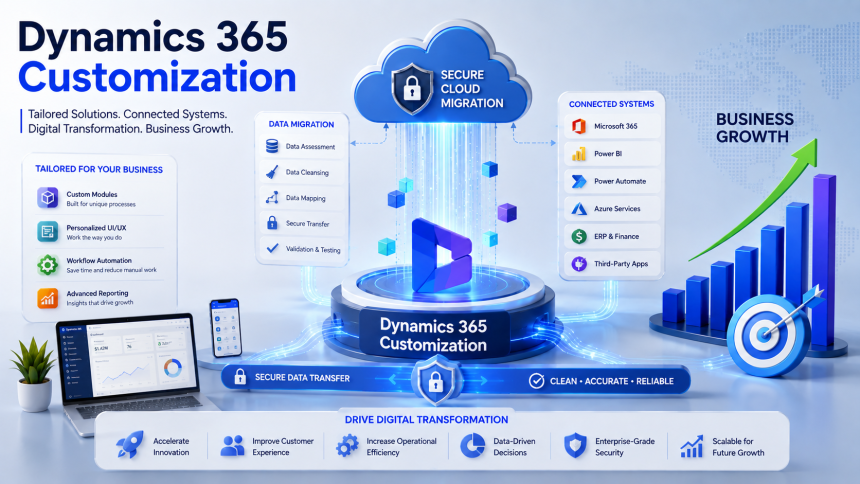
Data migration is an opportunity to improve the quality of information rather than simply transfer it from one system to another. Older platforms may contain duplicate accounts, incomplete customer profiles, inconsistent addresses, outdated contacts, or records that no longer support current business activities. If this information is moved without review, the new CRM may inherit the same problems and reduce confidence in reports and customer records.
Data cleansing should therefore take place before the final migration. Organizations can identify valuable information, standardize important fields, remove unnecessary duplication, and establish relationships between related records. Data mapping then determines how source information will correspond with the target CRM structure. Test migrations are useful for discovering transformation errors before production deployment. After the final transfer, business users should validate important records to confirm that essential customer histories and operational information remain accurate.
Extending the CRM Through Business Integration
A modern CRM rarely operates as an isolated system. Organizations often depend on accounting software, ERP platforms, marketing applications, communication tools, document repositories, analytics solutions, and customer portals. When these applications remain disconnected, employees may need to enter the same information several times or search across multiple systems before completing a task.
Dynamics 365 integration can create a connected environment in which relevant information moves between applications according to defined business processes. Power Automate can support workflow automation, while Power BI can help organizations analyze information from connected data sources. APIs and integration services can also support specialized connections with external platforms. Dynamics 365 Customization becomes particularly valuable when these integrations need to reflect unique organizational processes. A connected architecture can reduce manual data entry, improve consistency, and give teams better visibility into customer and operational activity.
Creating a Secure and Governed Environment
Security should be incorporated into the CRM architecture from the beginning. A customized system may contain sensitive customer information, sales records, financial data, service histories, and internal business details. Employees should receive access based on their responsibilities so they can perform their work without gaining unnecessary visibility into restricted information. Appropriate security roles, permissions, and organizational structures can support this balance.
Connected applications also require careful security planning because information may move between multiple platforms. Authentication, access permissions, integration endpoints, and data exchange processes should be reviewed during solution design. Businesses with compliance obligations may need additional auditing and governance controls. Security should not be treated as a one-time configuration because business structures and user responsibilities change over time. Periodic reviews help ensure that access remains appropriate while protecting important information throughout the CRM lifecycle.
Testing for Reliability Before Production
A customized CRM should be thoroughly tested before it becomes part of everyday business operations. Individual features may appear to work correctly during development but produce unexpected results when they interact with workflows, integrations, permissions, and business data. Testing therefore needs to evaluate the complete environment rather than focusing only on individual components.
Functional testing can confirm that forms, fields, business rules, and automated processes behave correctly. Integration testing can verify that information moves accurately between connected applications, while performance testing can reveal potential problems under realistic workloads. User acceptance testing adds another valuable perspective because employees can determine whether the solution supports their actual responsibilities. Issues discovered during testing should be corrected and retested before deployment. This reduces operational risk and helps users transition to the new environment with greater confidence.
Addressing Common Customization Challenges
One of the biggest challenges is deciding how much customization is appropriate. Organizations may have many feature requests, but implementing every request can create an environment that is expensive to maintain and difficult to upgrade. Custom code should have a clear purpose and should be introduced when standard capabilities cannot reasonably satisfy the requirement. Otherwise, the business may accumulate technical complexity without receiving equivalent value.
Other challenges include unclear requirements, poor documentation, inconsistent legacy data, integration dependencies, and limited user participation. Changing requirements during development can also affect timelines and project scope. Strong governance helps control these risks by evaluating proposed changes according to business value, usability, security, performance, and long-term maintainability. Regular communication between technical teams and business stakeholders ensures that the solution continues to address genuine operational priorities.
Best Practices for Sustainable CRM Development
Long-term success depends on treating the CRM as an evolving business platform. Organizations should use standard functionality wherever practical and reserve advanced customization for requirements that genuinely justify additional complexity. Clear documentation should explain the purpose of custom components, how they operate, and which processes depend on them. This makes future administration and troubleshooting easier.
After deployment, regular reviews can identify outdated workflows, unused features, performance issues, or new business requirements. User feedback is particularly valuable because employees can identify practical improvements through everyday experience. Training should also continue whenever major functionality changes are introduced. By combining governance, documentation, monitoring, and continuous improvement, organizations can maintain a cleaner CRM environment that adapts to business growth without becoming unnecessarily complicated.
Business Benefits of a Tailored CRM Platform
When a CRM reflects actual business processes, employees can work more efficiently and spend less time dealing with repetitive administration. Customized workflows can simplify approvals and routine activities, while tailored forms and views can make important information easier to access. Sales and service teams can work with more relevant customer information, improving consistency across interactions.
Integration can strengthen collaboration by reducing information silos between departments, while improved data quality can support more dependable reporting and forecasting. Management can gain greater visibility into operational performance through dashboards and business intelligence tools. As the organization grows, a well-designed CRM architecture can accommodate additional users, workflows, applications, and changing requirements. These improvements can contribute to stronger productivity, better customer experiences, faster decision-making, and greater value from the organization's digital technology investment.
Conclusion
A successful CRM customization strategy is ultimately about aligning technology with the way a business operates. Careful requirements analysis, migration planning, data preparation, integration, security, testing, and governance provide the foundation for a dependable solution. Organizations that focus on genuine business needs can avoid unnecessary modifications while still creating a platform that is flexible enough to support changing processes.
With continuous evaluation and responsible development, Dynamics 365 can become a powerful foundation for customer engagement, automation, analytics, and collaboration. The right approach does not simply make the CRM look different; it makes the platform work more effectively for the people and processes that depend on it. By combining thoughtful planning with long-term optimization, businesses can build a secure, scalable, and user-focused CRM environment that supports sustainable growth and digital transformation.
Vigortrix Review: Is It Worth Trying? Results, Pricing & Where to Buy
What Is Vigortrix? Vigortrix is a men's vitality dietary supplement designed to support e...




Golden Touch Fusion CBD – Premium Quality and Natural Wellness Support
What Are Golden Touch Fusion CBD? Golden Touch Fusion are a cannabidiol (CBD) supplement...