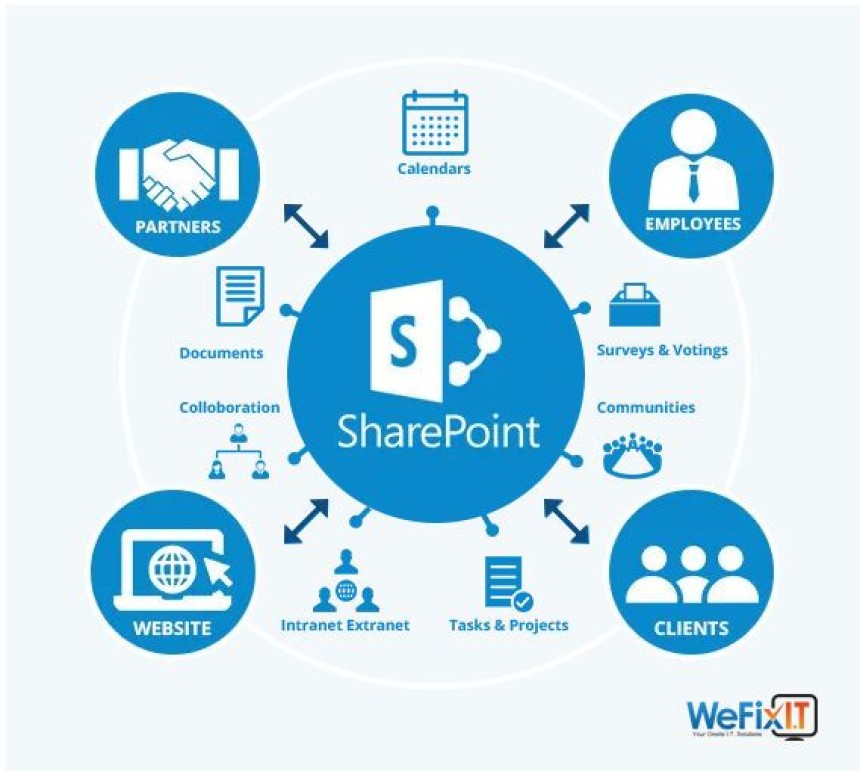

Transforming Workplace Collaboration through Modern SharePoint Intranet Development Services
This blog explains how modern SharePoint intranet development transforms workplace collaboration by supporting remote teams, seamless communication, and secure information access. It highlights the key features of intelligent information architecture, personalisation, responsive design, and integrated collaboration tools that help organisations boost productivity, enhance employee experience, and build a connected digital workplace.
Workplace collaboration has changed dramatically over the past decade. Remote teams, distributed workforces, and digital-first operations have become the norm rather than the exception. Traditional communication methods struggle to keep pace with these changes, leaving organisations searching for platforms that truly support how modern teams work. ProfessionalSharePoint intranet development services provide the foundation for this transformation, creating digital workplaces where collaboration happens naturally, regardless of physical location or organisational structure.
The Modern Workplace Reality
Today's workforce operates differently from previous generations. Employees expect the same seamless digital experiences at work that they enjoy in their personal lives. They switch between devices throughout the day, access information from multiple locations, and collaborate with colleagues across time zones and continents.
Organisations face the challenge of supporting this flexibility whilst maintaining security, ensuring compliance, and preserving company culture. Email and file shares no longer meet these needs. Modern teams require platforms that combine communication, content management, knowledge sharing, and social connection in unified experiences.
The gap between employee expectations and actual workplace technology creates frustration that affects productivity and engagement. When finding information requires navigating multiple systems or collaboration means endless email chains, people waste time on mechanics rather than focusing on meaningful work.
Core Elements of Modern Intranet DevelopmentIntelligent Information Architecture
Modern intranets organise information around user needs rather than organisational charts. This means creating navigation and content structures that match how employees think about their work. Someone looking for expense reimbursement information should find policies, forms, and submission procedures in one place rather than scattered across the finance, HR, and operations sections.
Metadata and tagging systems make content discoverable through multiple paths. A document about project management methodology might be tagged with relevant project types, departments that use it, and process stages where it applies. This allows different users to find the duplicate content through searches that reflect their specific contexts.
Personalised Experiences
Not everyone needs to see the same information. Sales teams require different resources than engineering groups. Regional offices have location-specific policies in addition to company-wide standards. Modern SharePoint intranet development services create personalised views that present relevant content to each user based on role, location, department, or other criteria.
Personalisation reduces information overload by filtering out irrelevant content whilst ensuring people never miss what matters to them. This balance between comprehensiveness and focus makes intranets more useful and encourages regular engagement.
Responsive Design
Modern intranets must work seamlessly across desktops, tablets, and smartphones. Responsive design adapts layouts and interfaces to different screen sizes whilst maintaining full functionality. This means more than just making pages viewable on mobile devices—it requires rethinking how features work to suit touch interfaces and smaller screens.
Mobile-first design approaches prioritise the mobile experience from the start rather than treating it as an afterthought. This ensures that features work well for all users regardless of their primary device, supporting the truly flexible work arrangements that modern organisations promise.
Collaboration Features That Drive EngagementTeam Workspaces
Dedicated spaces for teams, projects, and initiatives provide focused environments for collaboration. These workspaces include document libraries, task lists, calendars, and discussion areas customised for each group's needs. Team members can organise their work without cluttering the broader intranet with project-specific details.
Integration between workspaces and wider intranet resources maintains connectivity whilst supporting specialised workflows. A project team might have its own space for day-to-day work whilst easily accessing company-wide resources, templates, and expertise directories from the central intranet.
Real-Time Communication
Modern intranets integrate with communication tools like Microsoft Teams to bring conversations and content together. Discussing a document can happen in context rather than through separate email threads. File sharing in chat channels automatically stores documents in appropriate intranet locations, maintaining organisation without requiring manual filing.
This integration creates fluid workflows where communication and content management support each other. Team members can move seamlessly from discussion to document collaboration to task management without switching contexts or losing track of information.
Knowledge Management
Capturing and sharing organisational knowledge prevents the loss of expertise when employees leave or move to new roles. Modern intranets include structured knowledge bases, expert directories, and lesson-learned repositories that make institutional knowledge accessible to everyone.
Search functionality powered by artificial intelligence helps employees find answers even when they do not know precisely what they are looking for. The system understands context and relationships between content, surfacing relevant information based on the question's intent rather than just keyword matches.
Social Connection
Activity feeds, employee profiles, and recognition features help create a sense of community across distributed teams. Employees can share updates, celebrate achievements, and connect with colleagues beyond their immediate work groups. These social elements maintain company culture and personal connections even when people rarely meet face-to-face.
Balancing professional networking with appropriate boundaries requires thoughtful design. Social features should encourage genuine connection and knowledge sharing without creating distractions or privacy concerns.
Technical Implementation ConsiderationsCloud Architecture
Cloud-based SharePoint intranets offer advantages in scalability, maintenance, and accessibility. Organisations can scale resources based on demand without managing physical infrastructure. Automatic updates ensure access to the latest features and security patches without disruptive upgrade projects.
However, cloud deployment requires careful attention to data sovereignty, compliance requirements, and integration with on-premises systems that cannot move to the cloud. Hybrid architectures that combine cloud and on-premises elements provide flexibility for organisations with complex requirements.
Security and Permissions
Modern intranets must balance openness with security. Employees need easy access to information whilst sensitive content remains protected. Granular permission systems allow precise control over who can view, edit, or share specific content. Integration with identity management systems ensures that permissions automatically update when employees change roles or leave the organisation.
Multi-factor authentication, encryption, and data loss prevention features protect against both external threats and accidental internal breaches. These security measures should be transparent to users, protecting without creating friction in everyday workflows.
Integration Capabilities
SharePoint intranet development services should include connections to other business systems that employees use daily. Integration with HR systems allows automatic profile updates and organisational chart displays. Connections to project management tools surface task status and deadlines. CRM integration brings customer information into relevant contexts.
These integrations create unified experiences where employees access multiple systems through a single interface. Reducing the number of logins and contexts people must navigate saves time and reduces cognitive load.
Measuring Transformation SuccessUsage Metrics
Track employee engagement with the intranet using metrics such as daily active users, page views, search queries, and time spent on the platform. These quantitative measures show adoption levels and identify which features drive engagement. Low use of particular sections might indicate content quality issues, poor organisation, or a lack of awareness of available resources.
Productivity Indicators
Measure improvements in how quickly employees find information, complete everyday tasks, or access required resources. Compare the time spent on administrative activities before and after intranet implementation. Track reductions in duplicate work or version conflicts as collaboration tools improve coordination.
Employee Satisfaction
Surveys and feedback mechanisms reveal how employees feel about the intranet and whether it genuinely improves their work experience. Ask specific questions about finding information, collaborating with colleagues, and staying informed about company activities. This qualitative feedback identifies pain points that quantitative metrics might miss.
Business Impact
Connect intranet performance to broader business outcomes. Does improved collaboration correlate with faster project completion? Do better knowledge management capabilities reduce new employee training time? Can customer service improvements be linked to easier access to product information?
Building for the Future
Modern intranet development requires planning for evolution. Business needs change, technologies advance, and employee expectations shift. Intranets must adapt without requiring complete rebuilds. This means building on flexible foundations, using standard approaches where possible, and documenting customisations thoroughly.
Regular reviews ensure the intranet continues meeting organisational needs. Gather feedback continuously rather than waiting for annual surveys. Monitor usage patterns to identify emerging needs before they become critical problems. Maintain roadmaps that balance quick wins with strategic improvements.
Implementation Approach
Success requires more than technical deployment. Change management helps employees understand why the new intranet matters and how it benefits them personally. Training programmes should go beyond feature demonstrations to show real workflow improvements.
Champions within different departments can encourage adoption and provide peer support. These advocates understand both the technology and their colleagues' specific needs, making them effective bridges between IT teams and end users.
Starting with pilot groups allows testing and refinement before organisation-wide launch. Early adopters provide valuable feedback that improves the platform whilst becoming champions for broader deployment.
Conclusion
Transforming workplace collaboration through modern SharePoint intranet development creates digital workplaces where information flows freely, teams connect effortlessly, and employees spend time on meaningful work rather than fighting technology. The investment in professional intranet development delivers returns through improved productivity, better employee experiences, and stronger organisational culture.
Organisations that approach intranet development strategically, considering user needs, technical requirements, and business objectives together, build platforms that genuinely transform how work happens. The technology exists to support truly modern collaboration. Success depends on implementing it thoughtfully with a clear focus on the people who will use it daily.
What European Manufacturers Need From an Indian Event Partner
European manufacturers expanding in India bring high standards with them. They expect prec...


NBSK Pulp Price Trend Q2 2026 | Global Price Trends, Forecast, Chart,...

BCTMP Price Trend Q2 2026 | Global Price Trends, Forecast, Chart, Pric...