
Step-by-Step Guide to Outlook PST Password Recovery
How to Unlock a Password-Protected PST File in Outlook
Many people use Microsoft Outlook to keep their emails, contacts, and other data safe. But sometimes when we put a password on the PST file (Personal Storage Table) and forget it, it becomes difficult to access emails and other important data. At such times, the user needs Outlook PST Password Recovery.
In this blog, we will tell you how to recover the password manually and also give information about some professional tools that provide easy and fast solutions.
What is a PST file?
Outlook's PST file is a data file in which your emails, attachments, contacts, calendars and tasks, etc. are stored. This is the easiest way to keep a backup of your mailbox.
When you put a password on this file and forget it, the file does not open. In such a situation, password recovery is required.
Why is PST password recovery necessary?
- Forgotten password causes inaccessibility to mail and contacts.
- Email data is very important for business users.
- Without removing the password, it becomes impossible to use the backup data.
Manual Method: Outlook PST Password Recovery Without Third-Party Tool
Although Microsoft has not provided a direct option to remove PST file password, some old Microsoft PST Password Recovery Tools (like pst19upg.exe) and some workarounds available with Outlook can be used.
Manual Steps:
First, create a backup of your PST file.
Run Microsoft's old pst19upg.exe tool.
This tool can remove password protection or set a new password.
After this, you can import the PST file into Outlook.
Note: This method is quite old and does not work in new Outlook versions (Outlook 2016, 2019, 2021, and Microsoft 365).
PST Password Recovery with Third-Party Tools
If you need a fast and 100% working solution, then using PST Password Recovery Tools is the best option. These tools support not only the old but also the new Outlook versions.
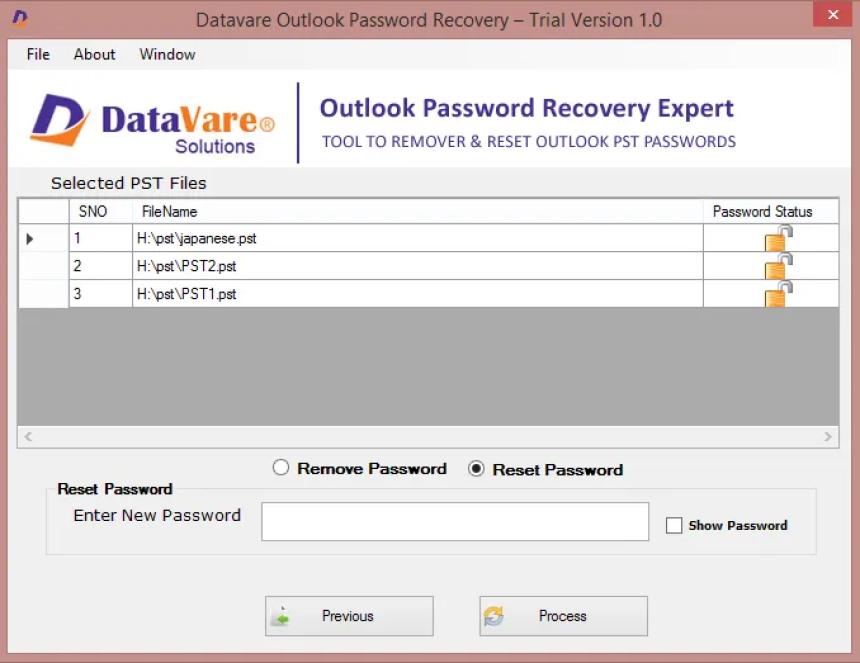
To solve this problem, here comes the DataVare Outlook PST Password Recovery Expert Tool, which is an easy, fast, and secure solution. This tool helps you recover forgotten or lost passwords so that you can reopen your PST file without any hassle.
Key Features of Outlook PST Password Recovery Expert Tool
Instant Password Recovery
This tool can recover any type of password in just a few seconds.
No matter how long or complex the password is, it gets removed easily.
All Outlook versions are supported
Works on all versions of PST files, including Outlook 2003, 2007, 2010, 2013, 2016, 2019, and 2021.
No data loss guarantee
This tool does not delete or corrupt your emails, attachments, or other data while removing the password.
Simple and user-friendly interface
Even non-technical users can use it easily.
The password can be removed in just a few clicks.
No PST file size limit
Whether the PST file is small or large (up to GBs), this tool works on every size.
How to recover a password with a third-party tool?
- Install the Outlook Password Recovery Expert Tool on your system.
- Click on the "Browse" button and select the PST file that has the password.
- The tool will automatically recover the password and show it to you.
- After this, you can import the password-free PST file into Outlook and use it.
Conclusion
If you have forgotten your Outlook PST password, there is no need to worry. If you want, you can try to remove the password using manual tools, but it does not always work on new Outlook versions. Therefore, the best way is to use a professional Outlook PST Password Recovery Tool. These tools are safe, fast, and reliable, & recover the password without harming your data.
Innovations in Cannulated Bone Screw Systems for Percutaneous Fixation
The evolution of minimally invasive orthopedic surgery has driven remarkable advances in c...

Advanced Cortical Bone Screw Technology in Modern Orthopedic Surgery
Orthopedic surgery continues to evolve with innovative fixation technologies that improve...
CrownX.com.pk: Exploring Android Games, Mobile Apps, and Digital Enter...
CrownX.com.pk: Exploring Android Games, Mobile Apps, and Digital Entertainment in Pakistan

