Precast Concrete Modeling with Revit: Best Practices and Challenges
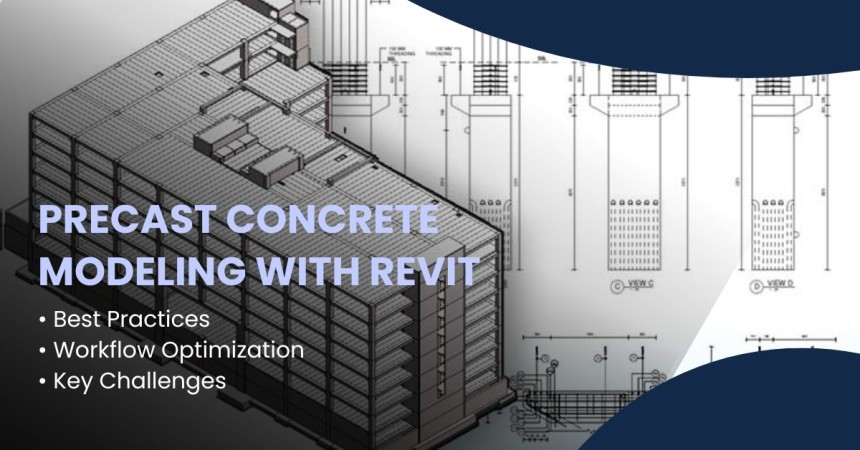
The use of Revit for precast concrete modeling provides designers and builders with an efficient method to create designs and construct buildings which enhances collaboration, reduces errors and shortens project timelines. The article shows the best practices to optimize workflows while demonstrating common challenges which emerge during optimization efforts.
Precast concrete is a construction method where concrete components are cast in a controlled environment before being transported to the construction site for assembly. Building Information Modeling (BIM) has transformed precast concrete detailing and modeling through tools such as Revit. The software allows users to create detailed models which help teams work better and reduce errors to achieve higher construction productivity.
The modeling of precast concrete in Revit offers numerous benefits but users need to understand specific difficulties that need advanced skills to resolve.
Benefits of Using Revit for Precast Concrete Modeling
Revit’s comprehensive set of tools makes it the perfect choice for modeling precast concrete structures. Here are some key benefits:
1. Improved Accuracy and Detail
Revit allows users to build complex models which ensure exact placement of precast components throughout the entire design structure. Designers can produce exact precast element models through Revit parametric tools which reduces the risk of production and installation mistakes.
2. Enhanced Collaboration and Coordination
Revit enables architects, engineers, contractors and fabricators to work together in real-time. This decreases the risks of miscommunication while improving team coordination and confirms that everyone uses the same precise and current data.
3. Streamlined Workflow and Reduced Rework
Teams can detect design conflicts at an early stage through direct precast concrete modeling in Revit which helps prevent expensive site work and construction delays. The workflow operates at a higher efficiency because of its automated documentation capabilities.
4. Integration with Manufacturing and Fabrication
Designers can achieve better precision and shorter production times through direct design-to-manufacturing capabilities which Revit provides when connected to advanced fabrication tools and CNC systems.
Best Practices for Precast Concrete Modeling in Revit
• Utilize Revit Families for Precast Components
One of the best practices for modeling precast concrete in Revit is to create custom families for precast components, such as beams, panels, columns, and slabs. Revit families ensure that each element is parametric and can be easily modified to meet specific project requirements.
• Implement Parametric Design for Flexibility
Parametric design is one of Revit's most powerful features. By defining parameters such as size, material properties, and thickness within families, you ensure that your precast components can be efficiently adjusted without manually updating each element.
• Organize and Manage the Project Files Effectively
A well-organized project is key to success in Revit. Ensure that you have a clear naming convention, an effective file management system, and proper folder structure. This makes it easier to collaborate, maintain version control, and reduce confusion across teams.
• Use Worksets for Team Collaboration
Revit’s worksets feature allows teams to work simultaneously on different parts of the model. For large precast projects, it's essential to split the model into manageable worksets, each assigned to different team members or disciplines (e.g., structural, architectural, or MEP).
• Leverage Revit’s Detailing Tools
Revit provides tools for detailing and annotation, which can help you ensure that the precast elements are accurately represented in construction drawings. Use detailing tools to create custom reinforcement and connection details for precast elements.
Case Study:
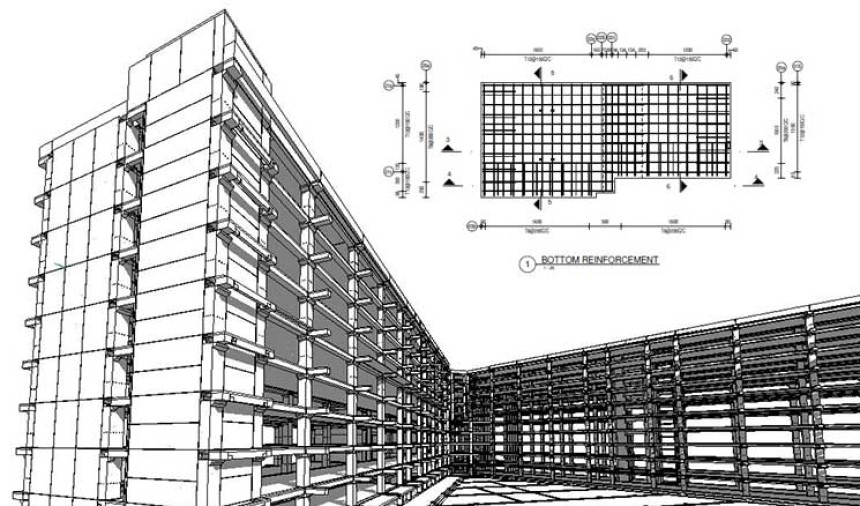
A precast manufacturer from the UAE outsourced its need to create a precast model at LOD 450 for a residential project in the UAE. CAD drawings, PDF, and Excel files were provided as input. Using Revit and Navisworks, the team at TrueCADD used concrete modeling workflows to create a 3D model at LOD 450, with precast shop drawings and Bar Bending Schedules (BBS).
The final model handed over to the client led to:
- Clash coordination of the model under 5 mm for M60 concrete grade
- Quick deliverable TAT with 100% accuracy
- Time and cost savings
- A unique ID integrated with each structural element for precise planning, sequencing, and erection
Challenges in Precast Concrete Modeling with Revit
• Complexity in Modeling Non-Standard Shapes
Precast concrete elements often come in complex, custom shapes that are difficult to model within Revit’s standard tools. The solution to this problem requires users to create their own families in Revit or to use Massing tools for generating complex designs.
• Managing Large Models with Numerous Components
The model becomes excessively heavy because precast concrete projects contain numerous different elements. The size of large files creates two major problems because it decreases system speed and makes it difficult to distribute files. The model requires optimization through two stages which involve eliminating unwanted families, eliminating excess items, and substituting embedded files with external file links when feasible.
• Handling Fabrication-Level Detail
Design-level modeling capabilities of Revit do not provide sufficient detail for fabrication needs including steel reinforcement placement and precast joint connections. The fabrication process requires more details which can be added through complete drawings or by linking Revit models to software.
• Integrating with Other Software Platforms
Many precast concrete manufacturers rely on specialized software to generate fabrication data. The main difficulty in Revit modeling stems from achieving proper integration between Revit and external third-party systems. This may require extra plugins together with a BIM coordinator who specializes in data management to achieve successful data exchange.
• Time-Consuming Customization
Creating custom precast families and components in Revit becomes prolonged when users attempt to make non-standard design modifications. This customization for accurate modeling but it creates delays during its first stages. This needs team members who have experience working with Revit family creation tools.
Key Strategies to Overcome Challenges in Precast Concrete Modeling
• Invest in Training and Support
Modeling precast concrete structures in Revit requires users to understand all software capabilities. Your team will reach its highest productivity level through ongoing training and Revit support resource availability which also minimizes errors.
• Utilize Revit Add-ons and Plugins
There are many third-party plugins designed to extend Revit’s functionality, particularly for precast concrete. The plugins help users perform tasks including reinforcement detailing, panelizing, and CNC machine interface operations. Choose the best tools for your workflow to get better results and improve model accuracy.
• Coordinate with Fabricators Early in the Design Process
To avoid issues during the fabrication stage, involve precast fabricators early in the design process. The team collaboration process enables the model to follow fabrication standards which minimizes differences between the original design and the finished construction.
• Optimize Model Performance
Large precast models need three fundamental management approaches which include model geometry simplification, heavy detail reduction, and linked file optimization. The model needs scheduled audits to detect unnecessary components which should be eliminated for achieving its best operational state.
Conclusion
Construction industry achieves better precision, enhanced teamwork, and shorter project timelines through Revit-based precast concrete modeling. The complete potential of this technology requires experts to execute established best practices when working with intricate designs and extensive models.
The precast concrete modeling process in Revit will improve through your efforts to build exact family models, enhance workflow efficiency, and implement supplementary tools. Project success depends on continuous teamwork and learning activities which help teams handle fresh project challenges that appear throughout the project duration.

Urgent Care Clinic Near Me: Fast Care for Everyday Emergencies | ER of...





Spain vs Argentina Tickets: Spain FIFA World Cup 2026 La Roja’s Title...
A Modern Online Gaming Platform for Entertainment Enthusiasts
A Modern Online Gaming Platform for Entertainment Enthusiasts
