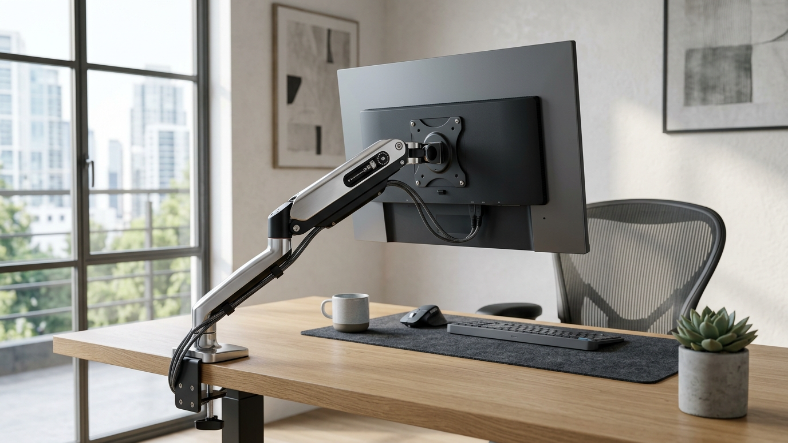

Monitor Arm Qatar – Ergonomic & Adjustable Monitor Mounts
Enhance your workspace with an adjustable Monitor Arm Qatar. Reduce neck strain, free up desk space, and create the ultimate ergonomic setup for work, gaming, or content creation.
Enhance your workspace with an adjustable Monitor Arm Qatar. Reduce neck strain, free up desk space, and create the ultimate ergonomic setup for work, gaming, or content creation. Choose from single or dual monitor arms, gas spring or mechanical options, and discover models available locally in Doha and online.
Why Use a Monitor ArmErgonomic BenefitsMonitor arms help position your screen at eye level, reducing neck and shoulder strain. Proper alignment enhances comfort, especially during long work or gaming sessions.
Desk Space OptimizationFree up your desk by raising monitors off the surface. Multi-monitor setups become easier to manage, and cable management is cleaner.
Ideal Users- Home office professionals
- Gamers and streamers
- Designers and video editors
- Students and corporate employees
Perfect for one screen. Supports monitor sizes 17″–32″ and is ideal for compact desks or home offices.
Dual Monitor ArmSupports two monitors simultaneously, improving productivity in multitasking setups. Often comes with independent tilt and rotation for each screen.
Gas Spring vs Mechanical Arms- Gas Spring Arms Smooth, effortless adjustments, ideal for frequent repositioning.
- Mechanical Arms Reliable, sturdy, lower cost, requires manual tension adjustments.
- Fixed Arms Simple, stable, no movement once installed.
- Full-Motion Arms Tilt, swivel, rotate, and extend your monitor freely.
Attaches securely to the desk edge, ideal for thick desks without drilling.
Grommet MountMounts through a pre-existing desk hole for stability and clean look.
Wall MountSaves desk space entirely; best for tight office setups.
VESA CompatibilityEnsure your monitor is VESA compatible (75×75mm or 100×100mm) for proper installation.
How Monitor Arms WorkAdjustability & MechanicsTilt, swivel, rotation, and height adjustments allow ergonomic positioning and multi-angle viewing.
Weight Capacity & StabilityMonitor arms are rated for specific weight ranges (usually up to 8-12 kg per arm). Proper selection ensures stability.
Cable ManagementBuilt-in clips or channels organize cables, keeping your desk tidy and safe.
How to Install and Use a Monitor ArmInstallation Step-by-Step- Check desk compatibility (thickness, hole placement).
- Attach the arm using clamp, grommet, or wall mount.
- Secure monitor to the VESA plate.
- Adjust height, tilt, and rotation.
- Organize cables using built-in channels or clips.
- Position the monitor at eye level.
- Maintain 45-75 cm distance from eyes.
- For dual monitors, align edges and tilt angles evenly.
- Adjust tension to prevent sagging.
Check the weight capacity and supported screen dimensions to match your monitor.
Desk Type & Surface Considerations- Clamp mount – thick desk edges
- Grommet mount – hole in desk required
- Wall mount – must support load
- Gaming – quick adjustments, dual arms preferred
- Office – ergonomic, adjustable height
- Designers – multi-monitor setups for productivity
Aluminum arms are lightweight and sturdy; steel arms support heavier monitors. Check manufacturer quality.
Comparing Monitor ArmsSingle vs Dual Monitor Arms- Single: saves space, simpler setup
- Dual: ideal for multitasking and productivity
- Gas spring: effortless movement, ideal for frequent adjustments
- Mechanical: more affordable, reliable, requires manual adjustment
- Clamp: simple, no desk modification
- Grommet: more stable, requires pre-existing hole
- Blupebble ViewMount Duo dual, full-motion, Doha availability
- Fellowes Platinum Series premium, ergonomic, gas spring
- Generic Aluminum Arms affordable, single or dual
- Al Anees Qatar
- PC Builder Qatar
- Lulu Hypermarket Online
- Carrefour Qatar Online
- Doha Electronics Market
- City Center Mall stores
- Entry-level single arm: QAR 150-350
- Dual/gas spring arms: QAR 500-1,200
- Premium full-motion arms: QAR 1,500+
Most retailers provide 1-2 year warranty. Check return/exchange policies before purchasing.
Troubleshooting & MaintenanceArm Won’t Hold Monitor ProperlyAdjust the tension or ensure the weight limit isn’t exceeded.
Adjusting Tension & StabilityUse built-in knobs or screws to fine-tune resistance.
Cable Management SolutionsRoute cables through built-in channels or clips for safety and aesthetics.
Desk Surface Compatibility IssuesCheck desk thickness and surface stability before installation.
What European Manufacturers Need From an Indian Event Partner
European manufacturers expanding in India bring high standards with them. They expect prec...



NBSK Pulp Price Trend Q2 2026 | Global Price Trends, Forecast, Chart,...

BCTMP Price Trend Q2 2026 | Global Price Trends, Forecast, Chart, Pric...