
How to Download Your MSME Certificate From the Udyam Portal in Easy Steps
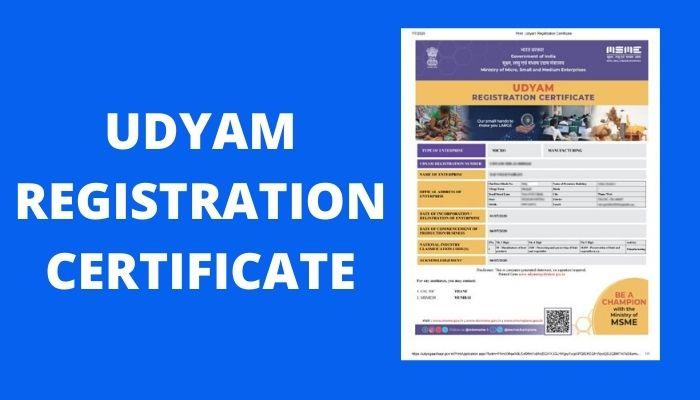
The Udyam Registration Certificate is an important document for MSMEs seeking government recognition and access to various benefits.
Introduction
The Micro, Small, and Medium Enterprises (MSME) sector is one of the key drivers of India's economic growth. To support and recognize these businesses, the Government of India introduced the Udyam Registration Portal, a simplified online platform for MSME registration.
Once registered, businesses receive an MSME Certificate, also known as the Udyam Registration Certificate, which serves as official proof of MSME status. This certificate helps businesses access government schemes, loans, subsidies, and other benefits.
In this guide, you'll learn how to msme certificate download from the Udyam portal and how to update it whenever business information changes.
What is Udyam Registration?
Udyam Registration is an online registration process introduced by the Government of India for Micro, Small, and Medium Enterprises. It enables businesses to obtain official MSME recognition through a simple and paperless process.
Key Features of Udyam Registration
- Fully online registration process
- No registration fee
- Instant recognition as an MSME
- Access to government schemes and incentives
- Simplified documentation requirements
Why is the MSME Certificate Important?
An MSME certificate provides several advantages to registered businesses.
Access to Financial Assistance
Registered MSMEs can apply for various government-backed loans, subsidies, and credit schemes.
Enhanced Business Credibility
An MSME certificate helps build trust among customers, suppliers, and financial institutions.
Tax and Regulatory Benefits
Eligible businesses can avail themselves of certain tax benefits and government incentives.
Better Opportunities in Government Tenders
Many government procurement programs provide preference to registered MSMEs.
MSME Classification Under Udyam Registration
Businesses are classified based on investment and annual turnover criteria.
Micro Enterprise
- Investment up to ₹1 crore
- Turnover up to ₹5 crore
Small Enterprise
- Investment up to ₹10 crore
- Turnover up to ₹50 crore
Medium Enterprise
- Investment up to ₹50 crore
- Turnover up to ₹250 crore
How to Download Your MSME Certificate from the Udyam Portal
Downloading your MSME certificate is a simple process that can be completed in a few minutes.
Step 1: Visit the Udyam Registration Portal
Open your browser and visit the official Udyam Registration portal.
Step 2: Navigate to the Certificate Download Section
On the homepage, locate the Print/Verify or Download Certificate option.
Step 3: Enter Your Udyam Registration Number
Provide your Udyam Registration Number that was generated during registration.
Step 4: Complete Verification
You may be asked to enter:
- Registered mobile number
- OTP verification
- Captcha code
This step ensures secure access to your certificate.
Step 5: Submit the Details
After entering all required information, click the Submit button.
Step 6: View and Download the Certificate
Once verification is successful, your MSME certificate will appear on the screen. Click the download option to save the certificate in PDF format.
Step 7: Save Multiple Copies
Store the certificate safely on your computer, cloud storage, and as a printed copy for future use.
When Should You Update Your MSME Certificate?
Keeping your MSME certificate update is important for maintaining compliance and accessing benefits.
Change in Business Structure
Updates may be required if your business changes from:
- Proprietorship to Partnership
- Partnership to LLP
- LLP to Private Limited Company
Change in Investment or Turnover
If your investment or annual turnover changes significantly, your MSME classification may need updating.
Change in Business Address
Businesses relocating to a new address should update their registration details.
Change in Contact Information
Changes in mobile number, email address, or authorized signatory details should also be updated.
How to Update Your MSME Certificate
The Udyam portal allows businesses to update their registration details online.
Step 1: Visit the Udyam Portal
Open the official Udyam Registration website.
Step 2: Log In to Your Account
Select the Update Udyam Registration option and enter your credentials.
Step 3: Access the Update Section
After logging in, locate the option to edit or update your registration details.
Step 4: Enter Updated Information
Provide accurate information regarding:
- Business structure
- Investment details
- Turnover figures
- Business address
- Contact information
Step 5: Upload Supporting Documents
Depending on the update, you may need to submit supporting documents for verification.
Step 6: Review and Submit
Carefully verify all information before submitting the update request.
Step 7: Receive Confirmation
After submission, you'll receive an acknowledgment or confirmation regarding your update request.
Step 8: Download the Updated Certificate
Once the changes are approved, download the revised MSME certificate from the portal.
Benefits of Keeping Your MSME Certificate Updated
Maintaining accurate registration details can provide several advantages.
Regulatory Compliance
Updated information ensures compliance with government regulations and policies.
Access to Additional Benefits
Changes in business classification may make you eligible for new schemes, subsidies, or incentives.
Improved Credibility
Accurate business information reflects professionalism and reliability.
Increased Business Opportunities
Updated records can improve eligibility for government tenders, contracts, and funding programs.
Frequently Asked QuestionsIs MSME Registration Mandatory?
No, MSME registration is voluntary. However, registering provides access to several government benefits and financial support programs.
How Long Does It Take to Get an MSME Certificate?
In most cases, businesses can download their certificate shortly after successful registration and verification.
What If I Forget My Udyam Registration Number?
You can retrieve your registration number using your registered mobile number through the Udyam portal.
Can I Register Offline?
No. Udyam Registration is currently available only through the online portal.
Can Multiple Businesses Be Registered Under One Udyam Number?
No. Each business entity requires a separate Udyam Registration Number.
Conclusion
The Udyam Registration Certificate is an important document for MSMEs seeking government recognition and access to various benefits. Fortunately, downloading the certificate from the Udyam portal is a simple process that requires only a few steps.
Whether you're a new entrepreneur or an established business owner, keeping your MSME certificate accessible and updated can help you maximize the advantages available to registered enterprises. By regularly reviewing and updating your registration details, you can maintain compliance, strengthen business credibility, and unlock new growth opportunities through various government initiatives.
What European Manufacturers Need From an Indian Event Partner
European manufacturers expanding in India bring high standards with them. They expect prec...



NBSK Pulp Price Trend Q2 2026 | Global Price Trends, Forecast, Chart,...

BCTMP Price Trend Q2 2026 | Global Price Trends, Forecast, Chart, Pric...