
How Pc Bottleneck Test Online Tool Helps Gaming?
If you’ve ever built or upgraded a gaming PC and still felt something was “off,” you’ve probably experienced a bottleneck without realizing it.
If you’ve ever built or upgraded a gaming PC and still felt something was “off,” you’ve probably experienced a bottleneck without realizing it. The game runs, but not the way you expected. FPS looks decent on paper, yet it feels inconsistent. Sometimes smooth, sometimes jittery. That’s where the idea of a PC bottleneck comes in.
I’ve seen this happen a lot. Someone pairs a powerful GPU like an RTX 3060 with an older i5 processor and expects flawless performance, only to end up confused when games don’t feel right. That confusion often leads people to search for a pc bottleneck calculator or test online tool hoping for a quick answer.
These tools can be helpful, but only if you understand what they are actually telling you. Otherwise, they can mislead you into unnecessary upgrades or wrong decisions.
In this guide, I’m going to break this down in a way that actually reflects real gaming experience, even when using a bottleneck calc. Not theory. Not marketing. Just what it feels like, how to interpret it, and how to fix it properly.
What is a PC Bottleneck in Gaming?A PC bottleneck in gaming is when one component limits the performance of another. Most commonly, it’s your CPU holding back your GPU or your GPU holding back your CPU.
But here’s what matters more than the definition. It’s how it feels in real gameplay.
When your CPU is the bottleneck, you’ll notice inconsistent FPS. The game might say 70 FPS, but it doesn’t feel smooth. You get microstutters, frame pacing issues, and sudden drops during busy scenes like explosions or crowded areas.
When your GPU is the bottleneck, things are more predictable. FPS is lower, but stable. The game feels consistently slow rather than erratic.
In my experience, beginners often assume low FPS equals bottleneck. That’s not always true. A bottleneck is about imbalance, not just performance level.
For example, pairing a high-end GPU like RTX 4070 with an older quad-core CPU doesn’t just reduce FPS. It creates uneven performance, which is far more noticeable and frustrating.
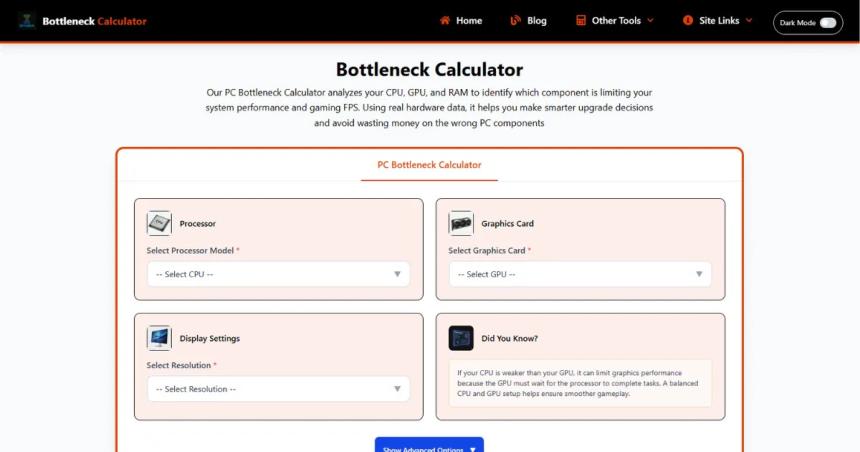
What is a PC Bottleneck Test Online Tool?A pc bottleneck test online tool is essentially a calculator that estimates how balanced your CPU and GPU are for gaming. You enter your processor, graphics card, resolution, and sometimes RAM, and it gives you a percentage indicating a bottleneck.
Most of these tools are known as bottleneck calculator gaming tools. They try to predict whether your CPU or GPU will limit performance in typical scenarios.
The idea is simple. If the tool says you have a 20 percent CPU bottleneck, it means your CPU might not fully utilize your GPU.
But here’s the important part. These tools are not measuring your actual system. They are making educated guesses based on general benchmarks and averages.
They can guide you, but they cannot replace real-world testing.
How Bottleneck Calculators WorkBottleneck calculators work by comparing the theoretical performance of your CPU and GPU using pre-collected benchmark data. They look at things like processing power, core count, clock speeds, and GPU rendering capability.
Then they simulate a “typical gaming scenario” and estimate which component would hit its limit first.
For example, if you input an i5-9400F and an RTX 3060, the calculator might flag a CPU bottleneck because the GPU is capable of pushing more frames than the CPU can process in certain games.
But here’s what most people don’t realize. These tools assume average conditions. They don’t know what games you play, your settings, or whether you run background apps.
They also don’t factor in optimization differences. Some games are CPU heavy like Cyberpunk or Battlefield, while others lean heavily on GPU like most single-player titles.
In my experience, these tools are better at spotting extreme mismatches than subtle ones. If you pair a very old CPU with a modern GPU, they will catch it. But for mid-range combinations, the results can be misleading or exaggerated.
How PC Bottleneck Tools Help Gaming PerformanceUsed correctly, a cpu gpu bottleneck test can actually save you from wasting money. That’s their biggest advantage.
Let’s say you already have an RTX 3060 and you’re thinking about upgrading your CPU. A bottleneck calculator might tell you your current i5 is holding back performance by 25 percent. That gives you a starting point.
But the real value comes when you combine that with common sense.
I’ve seen people upgrade from an i5 to an i9 expecting massive gains, only to see minimal difference in most games. Why? Because their GPU was already the limiting factor at their resolution.
On the other hand, if you’re playing competitive games like CS2 or Warzone, where high FPS matters, a CPU bottleneck becomes very noticeable. In those cases, the tool’s suggestion aligns more closely with reality.
These tools also help beginners understand balance. A lot of new builders overspend on one component and ignore the rest. They might buy a powerful GPU but pair it with slow RAM or an entry-level CPU.
A bottleneck calculator gives them a quick visual warning that something is off.
However, the biggest benefit is decision confidence. Instead of guessing upgrades blindly, you get a rough idea of where your system stands.
That said, I always recommend validating results with real gameplay or benchmarks. Tools tell you what might happen. Your games tell you what is actually happening.
Types of Bottlenecks in GamingNot all bottlenecks are the same, and understanding the type helps you fix the problem properly.
CPU bottleneck is the most talked about. This happens when your processor can’t keep up with your GPU. You’ll notice stuttering, inconsistent FPS, and poor performance in CPU-heavy scenes.
GPU bottleneck is actually very common and not always bad. It simply means your graphics card is fully utilized. The system is balanced, and performance is stable, even if FPS is not very high.
RAM bottleneck is often overlooked. If you have insufficient or slow RAM, games can stutter due to data swapping. This feels like random lag spikes rather than consistent low FPS.
Storage bottleneck shows up as long loading times and occasional stutter when new assets load. This is especially noticeable in open-world games.
Thermal bottleneck is another real issue. If your CPU or GPU overheats, it slows down automatically. This can mimic other bottlenecks but is actually caused by cooling issues.
In my experience, most people focus only on CPU and GPU and ignore everything else. But gaming performance is a system-wide balance, not just two components.
How to Use a PC Bottleneck CalculatorUsing a pc bottleneck test online tool is straightforward, but doing it correctly matters.
First, enter your exact CPU and GPU models. Don’t guess or pick something similar. Accuracy here affects the result.
Next, select your gaming resolution. This is very important. At 1080p, the CPU matters more. At 1440p or 4K, the GPU takes over. Many people ignore this and get misleading results.
Some tools also ask for RAM. If available, include it.
Once you get the result, don’t treat it as a final verdict. Treat it as a hint.
In my experience, it helps to test multiple scenarios. Try different GPUs or CPUs to see how the balance changes. This is especially useful if you’re planning an upgrade.
Think of it as a comparison tool rather than a diagnostic tool.
How to Read Bottleneck ResultsThis is where most people get it wrong.
If a bottleneck calculator gaming tool says you have a 10 to 15 percent bottleneck, that’s usually normal. No system is perfectly balanced.
If it shows 20 to 30 percent, it’s worth investigating. But it doesn’t automatically mean you need an upgrade.
Above 30 percent is where you might start noticing real issues, especially in CPU-heavy games.
But here’s the key point. The percentage is not directly equal to FPS loss. A 30 percent bottleneck does not mean you lose 30 percent FPS.
It simply indicates imbalance.
In real gaming, you might not notice anything at all, or you might feel stuttering depending on the game.
Always connect the result to your actual experience. If your games feel smooth, don’t chase numbers.
Common Mistakes When Using Bottleneck ToolsOne mistake I see constantly is people upgrading based only on the percentage.
They see a 25 percent bottleneck and immediately decide to replace their CPU, even though their games run fine.
Another common mistake is ignoring resolution. A setup that looks bottlenecked at 1080p might be perfectly balanced at 1440p.
People also assume these tools are precise. They are not. They are estimates.
Some users test combinations they don’t even plan to use and get confused by conflicting results.
And one big mistake is thinking bottleneck equals bad performance. That’s simply not true.
Every system has a bottleneck. The goal is not to eliminate it, but to make sure it doesn’t affect your experience.
Limitations of Bottleneck CalculatorsBottleneck calculators cannot measure real gameplay. That’s their biggest limitation.
They don’t know which games you play, your settings, or how optimized those games are.
They also ignore background processes, driver differences, and system tuning.
In my experience, they tend to oversimplify things. Gaming performance is dynamic, not static.
Two systems with the same hardware can perform differently based on cooling, RAM speed, or even Windows settings.
So while a cpu gpu bottleneck test is useful for quick checks, it should never be your only source of truth.
How to Fix Bottlenecks for Better GamingFixing a bottleneck depends on what’s actually causing it.
If your CPU is the issue, upgrading to a newer processor with better single-core performance usually helps. This is especially noticeable in competitive games.
If your GPU is limiting performance, lowering settings or upgrading the GPU is the solution. Sometimes just reducing resolution scaling can improve FPS significantly.
For RAM issues, increasing capacity to at least 16GB or improving speed can reduce stuttering.
Thermal problems are often ignored. Better cooling can restore lost performance without any upgrade.
In my experience, the smartest approach is not always upgrading. Sometimes tweaking settings gives better results.
For example, if your CPU is struggling, lowering crowd density or background simulation settings can stabilize performance.
Always identify the real bottleneck first. Don’t upgrade blindly.
Is Bottleneck Always Bad for Gaming?No, and this is something most people misunderstand.
A bottleneck simply means one component is working at full capacity before another. That’s normal.
In fact, a GPU bottleneck is often ideal. It means your graphics card is fully utilized and your system is balanced.
What you want to avoid is a bottleneck that causes instability. Stuttering, frame drops, and inconsistent performance are the real problems.
In my experience, chasing a “zero bottleneck” system is pointless. It doesn’t exist.
Focus on smooth gameplay, not perfect balance.
Best Free PC Bottleneck Test ToolsThere are several popular tools people use for a pc bottleneck test online.
PC Builds Bottleneck Calculator is one of the most common. It’s simple and beginner-friendly.
CPU Agent is another option that provides slightly more detailed comparisons.
UserBenchmark can also give insights, although it’s more focused on overall performance rather than bottleneck percentage.
In my experience, no single tool is perfect. It’s better to check multiple sources and look for consistent patterns rather than relying on one result.
ConclusionAt the end of the day, bottleneck tools are just guides. They can point you in the right direction, but they cannot replace real experience. What matters most is how your games feel, not what a percentage says.
If your gameplay is smooth, stable, and enjoyable, your system is doing its job. If it feels inconsistent, that’s when you start digging deeper using tools, benchmarks, and smart upgrades.
I’ve seen many people waste money chasing numbers instead of solving real problems. Don’t fall into that trap. Understand your system, test it properly, and upgrade only when it actually makes a difference.
FAQsWhat is a PC bottleneck in gaming?A PC bottleneck happens when one component in your system holds back the performance of another, usually the CPU or GPU. In gaming, this imbalance shows up in different ways depending on which part is struggling. If the CPU is the bottleneck, you’ll often notice stuttering, inconsistent frame pacing, and sudden FPS drops during complex scenes. If the GPU is the bottleneck, performance is more stable but capped at a lower FPS.
In simple terms, your system is only as fast as its slowest important part. Even if you have a powerful graphics card, it won’t perform at its full potential if the CPU can’t keep up. What matters most is balance, not just having one strong component.
How accurate are bottleneck calculators?Bottleneck calculators are useful, but they are not precise tools. They rely on general benchmark data and average scenarios to estimate how your CPU and GPU might perform together. That means they can give you a direction, but not an exact answer for your specific setup or gaming experience.
In real-world use, accuracy depends heavily on the game, resolution, settings, and even background tasks. I’ve seen cases where a calculator shows a high bottleneck, yet the actual gameplay feels perfectly smooth. So it’s best to treat these tools as a rough guide rather than a final decision-maker.
What is a good bottleneck percentage?A “good” bottleneck percentage is usually anything under 10 to 15 percent, which most systems naturally fall into. Even going up to around 20 to 25 percent is often fine, especially if you’re not experiencing any real performance issues while gaming.
The key thing to understand is that this percentage doesn’t directly translate to lost FPS. It simply shows how balanced your components are. In many cases, chasing a lower percentage doesn’t improve your actual gaming experience at all. What matters more is whether your gameplay feels smooth and consistent.
Can a bottleneck affect FPS?Yes, a bottleneck can affect FPS, but not always in the way people expect. A CPU bottleneck, for example, doesn’t just lower your average FPS. It often causes fluctuations, meaning your FPS might look okay on average but feel unstable during gameplay. This is where stuttering and frame drops become noticeable.
On the other hand, a GPU bottleneck usually results in lower but more stable FPS. In my experience, inconsistent performance feels worse than slightly lower FPS. So even if the numbers seem fine, a bottleneck can still negatively impact how smooth the game feels.
Is GPU bottleneck bad?A GPU bottleneck is actually quite normal and often ideal for gaming. It means your graphics card is being fully utilized, which is generally what you want. In this case, your CPU is doing its job well enough, and the GPU is the main factor determining performance.
This type of bottleneck usually leads to stable gameplay, even if the FPS isn’t extremely high. Compared to a CPU bottleneck, which can cause stuttering and uneven performance, a GPU bottleneck is much less noticeable and often preferable in real-world gaming scenarios.
How do I fix a PC bottleneck?Fixing a bottleneck starts with identifying which component is causing the issue. If your CPU is struggling, upgrading to a newer processor or adjusting in-game settings that rely on CPU performance can help. If your GPU is the limiting factor, lowering graphics settings or upgrading the GPU will improve performance.
However, not every bottleneck needs a hardware upgrade. Sometimes improving cooling, increasing RAM, or optimizing game settings can make a noticeable difference. In my experience, the best approach is to observe how your system behaves in actual games and then make targeted improvements instead of blindly upgrading components.
Was ist Sildenafil Citrat 100 mg? Vollständiger Medikamentenratgeber
Erfahren Sie, was Sildenafil Citrat 100 mg ist, wie es wirkt, welche Dosierung empfohlen w...
What Should You Know Before Hiring a Locksmith in Northridge, CA?
Life in Northridge moves quickly. Whether you're commuting along Reseda Boulevard, driving...

How to Choose the Right Locksmith West Hills for Homes, Cars, and Busi...
If you need a Locksmith West Hills, choose a licensed professional who can verify ownershi...
Oslo: Discover the Heart of Norway's Natural Beauty and Modern Culture
Oslo: Discover the Heart of Norway's Natural Beauty and Modern Culture